


- Blog
- >
- top 10 html5 game...
- >
- HTML5 game development company
- >
- Building Real-Time Strategy (RTS)...
Building Real-Time Strategy (RTS) Games with HTML5 for Cross-Browser Play
Getting a game to open in Chrome, Safari, Firefox, or Edge is only the beginning.
The harder part is making sure it still feels like the same game when the hardware, screen size, input method, available memory, browser behavior, and network quality change underneath it.
That is where cross-browser HTML5 game development becomes an architecture problem rather than a last-stage compatibility check.
A browser-based game may need to work on a desktop with a dedicated GPU, a mid-range Android phone, Safari on iOS, a game portal, or an embedded web view. Those environments can differ substantially even when they all support modern web standards.
Before production gets too far, the team needs a clear answer to a few practical questions: which environments matter, how the game will render, what the minimum performance target is, which framework fits the project, and how compatibility will be verified before release.
Defining Cross-Browser Support
“Cross-browser” only becomes useful once the supported environment is specific.
A release may cover desktop browsers, mobile browsers, game portals, social platforms, learning environments, campaign websites, embedded browser views, or some combination of them.
A browser name alone tells you very little.
Chrome running on a gaming PC and Chrome running on a lower-end Android device may expose many of the same APIs, but the two systems can behave very differently under real gameplay load.
A practical support matrix usually needs to define:
| Decision | What Needs to Be Specified |
|---|---|
| Delivery environment | Desktop web, mobile web, game portal, embedded web, other supported environments |
| Browsers | Browser families and minimum supported versions |
| Devices | Desktop classes, phones, tablets, representative lower-end hardware |
| Operating systems | Windows, macOS, Android, iOS, or other required systems |
| Input | Mouse, keyboard, touch, controller where applicable |
| Orientation and layout | Landscape, portrait, responsive behavior |
| Required integrations | Authentication, payments, ads, analytics, portal SDKs, APIs |
Once that scope exists, compatibility can be measured against something real.
Without it, browser QA tends to expand late in production as new devices and environments are added one at a time.
The Browser Stack Behind an HTML5 Game
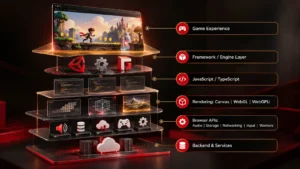
HTML5 is often used as shorthand for browser-game development, but the actual production stack is broader.
HTML and CSS may support the surrounding interface. JavaScript or TypeScript can handle application and game logic. Canvas, WebGL, or another graphics technology handles rendering. Browser APIs provide audio, storage, networking, input, and background-processing capabilities.
Frameworks and libraries sit on top of those foundations.
Phaser, for example, provides systems aimed specifically at 2D game development. PixiJS is more focused on rendering and leaves more of the application architecture in the development team’s hands. Three.js is widely used for custom 3D graphics in the browser, while Babylon.js provides a broader engine-style feature set. Construct 3 takes a more visual approach to production.
Choosing one of these technologies settles only part of the stack.
Persistence, deployment, backend services, multiplayer, browser support, and QA still need their own decisions.

Choosing a Rendering Path
Rendering requirements have a direct effect on framework choice, device coverage, visual scope, and performance.
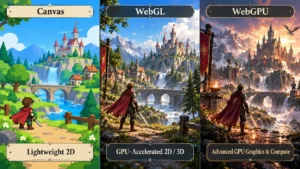
Canvas
Canvas can be a practical choice for relatively lightweight 2D games.
Typical examples include puzzles, card and board games, educational interactions, prototypes, simple casual titles, and branded experiences with controlled visual complexity.
Its simplicity is useful when the game does not need a heavier GPU-driven pipeline.
More demanding 2D scenes can change that calculation. Large numbers of sprites, particles, transforms, animations, and visual effects may be better suited to hardware-accelerated rendering.
WebGL
WebGL brings GPU-accelerated graphics to the browser and remains an important foundation for visually richer 2D games and 3D experiences.
Most teams will not need to build directly against the WebGL API. Frameworks and rendering libraries can handle much of the lower-level work while still using WebGL underneath.
That tends to produce a better tradeoff for game teams: enough rendering performance without forcing the project to build its graphics layer from scratch.
WebGPU
WebGPU exposes a newer generation of GPU capabilities and is increasingly relevant to more advanced browser graphics and compute workloads.
Its value depends heavily on the target audience.
A project aimed at a narrower set of modern environments may be able to take advantage of it more aggressively. A broader consumer release may still need WebGL or another fallback path.
For that reason, WebGPU is better treated as an architectural option than a default requirement.
Choosing the Browser-Game Stack
There is no universal “best” HTML5 game development tool.
The more useful comparison is the role each technology is expected to play.
| Technology | Typical Role | Best Considered When |
|---|---|---|
| Phaser | 2D browser-game framework | The project needs established game systems for a 2D web title |
| PixiJS | High-performance 2D rendering library | The team wants a custom architecture around a rendering layer |
| Three.js | 3D graphics library | The project needs custom browser-based 3D graphics and scene control |
| Babylon.js | Browser-focused 3D engine | The production needs a broader 3D feature set |
| Construct 3 | Visual game-development environment | Rapid 2D production or prototyping benefits from a visual workflow |
| Canvas API | Direct 2D drawing | Rendering requirements are lightweight or highly custom |
| WebGL / WebGL2 | Accelerated graphics API | The team needs lower-level rendering control |
Prototype speed is only one part of the decision.
A framework also has to remain manageable once the game accumulates content, integrations, platform-specific behavior, and post-launch maintenance.
Useful checks include:
- Is the technology actively maintained?
- Does it cover the required browser range?
- Can the existing team maintain the architecture?
- Is debugging practical?
- How dependent is the project on third-party packages?
- Are upgrade paths realistic?
- Does the stack fit the actual deployment environment?
- Will the same choice still make sense once the production becomes larger?
A fast prototype can become expensive later if the technical foundation starts fighting the product.
Detect Capabilities Instead of Guessing From the Browser
Browser labels are a poor substitute for checking what the current environment can actually do.
Where practical, the game can detect whether the required graphics API, storage capability, input mechanism, audio feature, or other browser functionality is available before relying on it.
Even that is only half the compatibility picture.
A phone may technically expose WebGL and still struggle with the intended scene complexity. API availability tells you that a feature exists; real-device testing tells you whether the game can use it effectively.
Both matter.
Designing for Desktop and Mobile
A common browser codebase can save a great deal of duplicated engineering, but it does not remove the differences between desktop and mobile interaction.
Desktop players may rely on precise pointer input, mouse hover, keyboard commands, and large information panels.
On a phone or tablet, the same interface may need larger touch targets, simplified information density, gesture controls, orientation-aware layouts, or a different menu structure.
Responsive resizing alone rarely solves those problems.
Strategy, simulation, management, and multiplayer games are especially sensitive because their interfaces often expose several systems at once.
Testing the interaction model early is far cheaper than discovering near release that a desktop-first control scheme feels awkward on touch.
Asset Delivery and the First Session
Browser distribution is attractive partly because the player can follow a link and start without installing a conventional application package.
A heavy initial download can quickly undermine that advantage.
The first session therefore benefits from a clear split between content needed immediately and content that can arrive later.
Depending on the game, that might mean loading later levels, maps, high-resolution assets, audio, optional cosmetics, or other content only when it becomes relevant.
Caching can reduce repeat downloads for returning users, and suitable local data can be stored in the browser when the architecture calls for it.
Three practical questions are worth answering early:
- What has to be available before play begins?
- What can load in the background or later in progression?
- Which features stop working when the connection becomes unstable?
That last point matters because cached assets do not make server-dependent systems independent of the network. Authentication, cloud saves, live data, remote progression, payments, and multiplayer still rely on their backend services.
Performance as a Compatibility Requirement
Performance needs to be treated as part of browser support from the start.
A game can pass a basic compatibility test and still deliver a poor experience if it takes too long to start, runs out of memory, drops frames under normal gameplay load, or overheats the target device.
Useful production budgets can cover:
- initial download size;
- time to first playable state;
- memory use;
- frame time;
- number of active objects;
- visual effects;
- audio assets;
- network activity.
Those targets do not have to be identical on every device.
A higher-end desktop can support richer effects and more visual complexity than a lower-end phone. Quality tiers, reduced particle counts, lower-resolution assets, lighter post-processing, or other graceful fallbacks can preserve gameplay without forcing every device to carry the same rendering load.
Keep Expensive Work Away From the Main Thread Where It Helps
Input handling, browser events, JavaScript execution, layout work, and parts of the game loop can all compete for main-thread time.
Heavy calculations can introduce visible stutter even when the rendering pipeline itself is not the primary problem.
Web Workers can help with suitable tasks such as procedural generation, pathfinding, AI calculations, larger data transformations, or simulation work that does not need direct access to page elements.
There is a tradeoff.
Moving work into another execution context adds communication and maintenance overhead, so profiling is more useful than applying workers everywhere by default.
Test Representative Gameplay
Performance conclusions are only meaningful when the test resembles the finished product.
An almost empty development scene reveals very little about a release that will eventually contain full UI, effects, audio, enemies, units, network traffic, backend requests, and third-party integrations.
Representative lower-end hardware matters here as well.
A development workstation can hide limits that become obvious immediately on the devices players are actually using.
Multiplayer Adds a Separate Constraint
A multiplayer browser game has more to solve than persistent network communication.
WebSockets can provide a two-way connection between client and server, but the production still needs a clear model for state ownership, synchronization, latency, reconnects, session handling, scalability, authentication, and invalid client state.
Those decisions belong to the multiplayer architecture itself.
For cross-browser QA, the main concern is making sure the networked experience remains reliable across the browsers, devices, and connection conditions included in the support matrix.
For the deeper networking discussion, see Building Multiplayer HTML5 Games: Challenges and Solutions.
Build a Browser and Device Test Matrix
Cross-browser QA works best when it mirrors the release scope rather than whatever devices happen to be available at the end of production.
A useful matrix can cover:
| Area | What to Test |
|---|---|
| Rendering | Missing effects, resolution, scaling, visual artifacts, fallbacks |
| Input | Mouse, keyboard, touch, controller where required |
| Responsive UI | Screen sizes, orientation, viewport changes, browser chrome |
| Performance | Frame stability, memory, loading, lower-end devices |
| Audio | Playback, interruptions, mute behavior, browser restrictions |
| Networking | Slow connections, disconnects, reconnects, API failures |
| Storage | Save behavior, cache behavior, storage failure or clearing |
| Lifecycle | Tab switching, backgrounding, suspended sessions, return to play |
| Integrations | Login, ads, analytics, payments, portal SDKs, external APIs |
Release severity matters too.
A missing cosmetic effect on an older device may be acceptable. Broken touch input, corrupted progression, failed authentication, or an unplayable frame rate are not.
QA needs thresholds, not merely a list of browsers with pass/fail labels.
Test the Real Deployment Environment
A game can behave perfectly when opened directly in a browser and then encounter problems once it is embedded in the environment where players will actually use it.
Game portals, E-commerce platforms, learning systems, campaign sites, social platforms, web views, and third-party SDKs can all introduce their own constraints.
Layout restrictions, authentication flows, cross-origin behavior, storage limitations, or integration failures may only become visible after the game is placed inside that final environment.
That environment belongs in the test plan.
Validate the Highest-Risk Assumptions Early
Not every production risk deserves the same amount of early attention.
Focus first on the areas most capable of forcing an architectural change.
Rendering: Build a representative scene rather than relying entirely on placeholders. The graphics stack needs to prove itself against the expected visual load.
Input: Test the real control model on desktop and mobile where both are in scope. Mouse-first interaction often exposes touch problems quickly.
Browser coverage: Put early builds in the target browser families before large sections of the game depend on environment-specific behavior.
Loading: Measure the first playable experience with realistic assets instead of waiting for the full content library.
External systems: Authentication, payments, analytics, ads, multiplayer, APIs, and portal SDKs deserve early integration tests when the product depends on them.
Lower-end devices: Include constrained hardware before the technical baseline is considered stable.
For the broader end-to-end production sequence, see the steps to create an HTML5 game.
Where Browser Delivery Has a Real Advantage
HTML5 is especially useful when lowering the barrier to entry matters.
That can make browser delivery a strong fit for:
- game portals;
- casual games;
- promotional experiences;
- branded games;
- interactive campaigns;
- playable demos;
- learning games;
- gamified web products;
- social experiences;
- embedded games.
More technically ambitious browser games are possible as well.
The relevant tradeoff is whether the visual complexity, content size, simulation load, input model, multiplayer requirements, and intended device range make sense for a browser-based release.
The value is not simply that one codebase can reach several environments.
It comes from combining web distribution with an architecture that respects the limitations and strengths of those environments.
Final Thoughts
Cross-browser HTML5 development works best when compatibility is treated as part of the architecture, not as a cleanup task at the end.
The rendering stack needs to suit the game. Framework choices need to survive beyond the prototype. Input and interface behavior may need to change between desktop and mobile. Asset delivery, performance limits, integrations, and browser coverage all need explicit targets.
Testing those assumptions early gives the team room to change course while the architecture is still flexible.
That is what makes browser delivery predictable: not the promise that one build will behave identically everywhere, but a clear understanding of where the game needs to work and what each of those environments demands.
For teams moving from technical planning into production, Red Apple Technologies supports browser-game development within its broader Game Development capabilities, including HTML5 and WebGL engineering, backend integration, multiplayer, testing, optimization, and post-launch support.

Published by
Kaushik Dey
Related Blogs
Discover more stories & insights that inspire
The mobile gaming industry is no longer just about entertainment; it has become a multi-billion-dollar ecosystem that powers businesses, creators, and entire esports communities. With billions of active players worldwide,...
Dedicated Hiring is gradually emerging as a cost-effective business model that allows enterprises access to highly-qualified and experienced game developers around the world for their game projects. It allows them...
As the population of mobile gamers is steadily rising, developing engaging mobile games has become a priority for enterprises worldwide. Presently, the mobile gaming population has reached the mark of...
Investment in HTML5 games is not restricted to the game industry only. Even sectors like E-commerce and Edtech are also investing in developing browser games using HTML5. Presently, the popularity...
HTML5 has redefined browser gaming with auto-updates, offline mode, and several other useful features. This has influenced enterprises to invest in this game segment with the help of top-rated game...
Creating multiplayer games using HTML5 presents a unique set of challenges and opportunities. HTML5 has revolutionized web gaming by enabling complex game mechanics and rich user experiences directly within browsers,...

As the global game industry is evolving into a competitive segment, releasing cross-platform browser games is emerging as a lucrative option for businesses. Besides enhancing their market and audience reach...

Presently, there are over 3.2 billion video gamers around the world. This presents an exciting opportunity for enterprises in the USA and Canada to boost their market and user reach....

Undoubtedly over the last decade, the industry of gaming has been growing exponentially. The gaming spectrum is a billion-dollar market now and is all set to incorporate advanced tools and...
Game development is a continuous process that has undergone a sea change in recent times. With the increasing demands, game development companies are devising new ways to make games more...


 Book An Appointment
 WhatsApp