


Before You Build: Is Unity Game Engine the Right Tech to Invest In?
Your choice of game engine influences production timeline, costs, scalability, and even the kind of game you can build. Unity game engine is a versatile option for businesses. It supports 2D and 3D games, mobile and desktop games, multiplayer experiences, and AR and VR applications. Unity also has a mature ecosystem that can help teams move from an early prototype to a production-ready game.
Still, engine fit is a big deal for every project. The right choice depends on what you are building, who you are building it for, and how you expect the product to grow. This guide looks at the benefits, limitations, and costs of the Unity engine to help you make that decision.
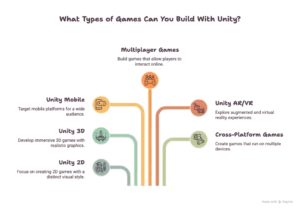
What Types of Games Can You Make With Unity Engine?
One of Unity’s biggest advantages is the range of projects that can be developed within the same ecosystem. That flexibility becomes valuable when your business is still deciding exactly how the game will evolve.
2D Games
Unity can support 2D games across a wide range of styles. This includes:
- Casual games
- Puzzle games
- Platformers
- Card games
- Strategy games
- Simulation games
- Mobile games
A 2D game does not always need a large tech stack. But the project may still need strong animation, UI, audio, backend services, analytics, or monetization. Unity gives teams room to add those systems as the project grows.
3D Games
You can build:
- Action games
- RPGs
- Adventure games
- Simulation games
- Sports games
- Survival games
- Open-world experiences
The scope can vary widely. A focused 3D mobile game may require a relatively small team. A large open-world project can involve extensive environment production, animation, AI, networking, and optimization. Making 3D games using Unity opens the door to more complex environments, character systems, and physics.
Mobile Games
With Unity, you can build for both major mobile platforms while working within the same development environment. This becomes valuable when your business wants to test the game with one audience and expand later. It also gives developers a familiar foundation when optimizing the experience for different devices.
That said, mobile development comes with its own challenges. Performance, device fragmentation, and player retention can have a greater impact on the product than the choice of engine itself. You need to optimize the game for the target devices. This is where rapid prototyping comes in handy.
Multiplayer Games
Multiplayer changes the technical and financial requirements of a game.
You need to think about the complexity factors like networking, server architecture, matchmaking, player synchronization, security, and ongoing content updates. These requirements significantly affect cost.
Unity’s 2026 Game Development Report found that 83% of surveyed developers are building online multiplayer games. Among multiplayer studios, 47% typically support between three and nine concurrent players in a session.
If multiplayer is central to your game, Unity is worth considering, but test the networking architecture early. Build a small multiplayer prototype to evaluate the complexity factors. This will give you a more realistic picture of development costs.
AR/VR Games
Unity supports AR/VR game development and broader XR development as well. This opens opportunities for:
- Training simulations
- Interactive experiences
- Mixed reality applications
AR/VR projects require careful attention to performance. Frame rate, interaction design, and comfort can affect the overall quality of the product. Evaluate the target hardware early. A prototype should test the core interaction model on the actual devices you expect your customers to use.
Cross-Platform Games
Unity is a good fit for cross-platform games. The 2026 Unity report found that 72% of surveyed developers prioritize cross-play functionality. The biggest challenge reported by them was maintaining a consistent experience across platforms. Which means it requires platform-specific work because controls, performance, interface design, and hardware capabilities vary considerably between devices.
Check out some of the game development projects completed by Red Apple Technologies.
Is Unity a Good Investment for Making Games?
If your game needs fast iteration, broad platform support, and room to grow after launch, Unity is a good investment. It is especially worth considering when you want to test your game idea before committing a large production budget.
Let’s make your decision easier.
Unity is worth considering if:
- Your game needs to launch on multiple platforms: If you are planning to release on mobile first and expand to PC or other platforms later, Unity supports that roadmap. You will still need platform-specific optimization and testing, but you can build around a common technical foundation.
- You expect the game to evolve after launch: Some games are designed around a single release. Others depend on new content, feature updates, and continued player engagement. Unity gives you a highly scalable environment to accommodate that growth from the beginning.
- You want to validate the idea before making a large investment: This is one of the strongest reasons to consider Unity. According to Unity’s 2026 Game Development Report, 46% of surveyed developers keep the prototyping phase between one and three months.
- Your project requires both 2D and 3D capabilities: If your current idea is 2D but your roadmap may involve 3D elements, or if you are still exploring the product direction, Unity gives you the flexibility.
- You want rapid iteration: Developing a game involves constant changes. A mechanic may need to be redesigned after testing. A feature may prove too expensive. Players may respond differently from what the original concept predicted. Unity supports that workflow.
- You require talent availability: Unity uses C#, which is taught globally. So finding experienced developers is going to be easier than proprietary platforms.
When is Unity Not a Good Investment?
- Your game has highly specialized technical requirements: For example, bleeding-edge 3D graphics, photorealistic AAA fidelity, high-end visual rendering are better handled by Unreal.
- You want budget predictability: Unity has a tiered licensing structure along with a runtime fee policy. So costs may add up as you build and modify the game. An experienced company can guide you through this well.
- Your team does not have expertise: Unity has a moderate learning curve. So you will need to factor in training and ramp-up costs and development schedule accordingly.
Considering building games using the Unity engine? Get in touch with Red Apple Technologies at +91-8017779602 or info@redappletech.com to discuss your idea.
Unity vs. Unreal: Which Game Engine Should You Choose?
Both are capable of handling serious commercial game development, and the choice depends on what you are building. The quick answer is: choose the Unity engine for making 2D, mobile, or lightweight 3D games. Choose Unreal when you need to create AAA-style, graphically intensive games.
| Factor | Unity Game Engine | Unreal Game Engine |
|---|---|---|
| 2D games | Strong fit | Possible, but often overkill |
| 3D games | Strong fit | Strong fit |
| Mobile games | Strong fit | Supported |
| PC games | Strong fit | Strong fit |
| Console | Strong fit | Strong fit |
| AR/VR | Strong fit | Strong fit |
| Cross-platform | Strong fit | Strong fit |
| Multiplayer games | Supported | Supported |
| Rapid prototyping | Strong fit | Strong fit |
| High-end visual fidelity | Possible | Strong fit |
| Large-scale 3D worlds | Possible | Strong fit |
| Small and mid-sized teams | Strong fit | Strong fit |
| Highly specialized AAA visual requirements | Evaluate based on your requirements | Strong fit |
Unity when: flexibility is a priority. In a comparison between Unity vs. Unreal, Unity is the better choice when your game needs to reach several platforms or when the product is likely to evolve during development. This is particularly useful for businesses that are still validating their game concept. You may begin with a mobile prototype and later decide to expand to PC. You may also discover that a particular gameplay mechanic deserves more development than you initially expected.
Unreal when: visual fidelity is central to the product. The engine is designed around high-end real-time 3D rendering and provides tools for detailed environments, advanced lighting, animation, and large-scale world building.
How Does Unity Compare With Other Technologies?
1. Godot Engine
- Best for: 2D games, lightweight 3D games, indie games, and teams that prefer open-source technology.
- Language: GDScript, C#, and C/C++ through GDExtension.
- Why choose it: Godot Engine is free and open source under the MIT license. It provides dedicated 2D and 3D workflows and a node-based scene system that makes it relatively straightforward to structure game projects.
Godot is an attractive option when control over the development environment and low overhead are important. Unity is suitable when a project requires a larger commercial ecosystem, extensive third-party integrations, or a broader pool of developers with experience in the technology.
2. CRYENGINE
- Best for: High-fidelity 3D games, realistic environments, and visually demanding experiences.
- Language: C++ and Lua.
- Why choose it: CRYENGINE is built around high-quality real-time graphics and provides technologies for rendering, lighting, physics, and detailed 3D environments.
CRYENGINE is worth considering if you’re building a specialized first-person shooter or a game featuring expansive, detailed natural environments. Its rendering and terrain capabilities make it relevant for projects where realistic outdoor settings are central to the experience.
3. GameMaker
- Best for: 2D games, indie games, rapid prototyping, and teams that want a streamlined development workflow.
- Language: GML (GameMaker Language) and visual development tools.
- Why choose it: GameMaker focuses heavily on building accessible 2D games with a quick turnaround. It is well suited to puzzle games, arcade games, pixel-art games, and other projects where advanced 3D capabilities are unnecessary.
The advantage is specialization. If you already know that your project will remain a focused 2D game, GameMaker offers a simpler development workflow. Unity game engine is more attractive when the project may grow into 3D, multiplayer, multiple platforms, or more complex systems.
4. HTML5 / Web Technologies
- Best for: Browser games, instant-access games, web-based experiences, lightweight multiplayer games, and projects where players should be able to start playing without installing an application.
- Language: JavaScript, with HTML and CSS; Canvas and WebGL are commonly used for graphics.
- Why choose it: HTML5 uses the web itself as the distribution platform. Modern browsers support technologies such as Canvas and WebGL for 2D and 3D graphics, while WebSockets and WebRTC can support real-time communication and multiplayer functionality.
HTML5 can also support surprisingly sophisticated 3D experiences. WebGL provides hardware-accelerated 2D and 3D graphics in modern browsers, and frameworks such as Three.js, Babylon.js, PlayCanvas, and Phaser can provide higher-level development workflows.
The trade-off is that a browser-first architecture introduces different performance, browser compatibility, loading, and device constraints. If the game needs native mobile or console experiences, complex platform integrations, or a large engine ecosystem, Unity is a better foundation.
5. GDevelop / Construct
- Best for: No-code or low-code development, prototypes, educational projects, simple games, and browser-first experiences.
- Language: Visual event-based logic with additional scripting options depending on the platform.
- Why choose them: GDevelop and Construct make it possible to build games without requiring traditional programming for every part of the development process. They can be useful for prototypes, game jams, simple mobile games, educational projects, and smaller browser experiences.
Comparison Table: Unity vs. Unreal vs. Godot vs. CRYENGINE vs. HTML5
| Engine/Framework | Best Suited For | Primary Programming Language | Monetization/Licensing |
|---|---|---|---|
| Unity | Cross-platform 2D/3D, mobile, and mid-tier indie games | C# | Free tier available; seat-based subscription fees apply after revenue milestones |
| Unreal | High-fidelity 3D graphics, PC, and Console blockbusters | C++ / Blueprints | Free to use; 5% royalty kicks in only after a game earns $1M USD |
| Godot | Lightweight 2D & 3D indie games, excellent web exports | GDScript / C# | Completely free and open-source (MIT License) |
| CRYENGINE | Photorealistic graphics, high-fidelity open-world environments, and intense 3D action games | C++ (Qt), C#, Lua | Free to use; you only pay a 5% royalty fee on gross receipts calculated at the source after your game crosses $5,000 in annual revenue |
| Gamemaker | Dedicated, rapid 2D pixel-art or commercial arcade games | GML (GameMaker Language) | Free for non-commercial use; tier subscription or one-time license for console exports |
| HTML5 Frameworks | Instant-play web browser games, hyper-casual mobile | JavaScript / TypeScript | Open-source options (Phaser, Three.js) are completely free |
How Much Does Developing a Game With Unity Engine Cost?
The cost of developing a Unity game can range from $10,000 to $500,000+ depending on whether it is a simple prototype, a casual game, or a feature-rich 3D or multiplayer title. It all comes down to the game’s complexity. Which may include art requirements, gameplay features, backend infrastructure, and development team rate.
| Type of Unity Game | Estimated Cost | Typical Timeline |
|---|---|---|
| Simple 2D / Hyper-casual | $10,000-$30,000 | 2-4 months |
| Simple 3D/Casual | $30,000-$100,000 | 4-8 months |
| Multiplayer/Mid-core | $75,000-$250,000 | 6-12+ months |
| RPG/Simulation | $100,000-$500,000+ | 9-18+ months |
| Large scale | $250,000-$1,000,000+ | 12-36+ months |
Please note, these are broad industry estimates rather than fixed quotes.
For a more accurate estimate, get in touch with Red Apple Technologies at +91-8017779602 or info@redappletech.com to discuss your idea.
What Are the Risks of Investing in Unity Game Engine?
1. Feature Deprecation and Migration Costs
Unity’s ecosystem evolves continuously. Some packages, workflows, and APIs are eventually deprecated or replaced. When a project depends heavily on a system that changes, developers may need to spend significant time migrating code and assets.
2. Performance and Memory Overhead
Poor memory management, excessive allocations, complex scenes, and inefficient systems can lead to frame-rate issues or memory problems. Developers may need techniques such as object pooling, asset optimization, and platform-specific performance tuning to keep the game running smoothly.
3. Large Projects Require Strong Architecture
Unity game engine makes prototyping and early development relatively fast, but larger projects require disciplined architecture. As the number of features, developers, assets, and platforms increases, poorly structured projects may become slower to build.
4. Dependence on Third-Party Assets and Plugins
Unity’s ecosystem provides thousands of assets and plugins to accelerate development. But relying too heavily on them creates dependencies. A critical plugin may become incompatible with a future Unity version or stop receiving updates. This can force a team to replace the system or maintain it themselves.
Unity Game Engine: Risks & Ways to Mitigate
| Risk | Potential Impact | How to Reduce the Risk |
|---|---|---|
| Feature Deprecation & Migration | Changes to Unity packages, APIs, or workflows can require costly code and asset migrations | Use stable releases, limit unnecessary dependencies, and plan engine upgrades |
| Performance & Memory Overhead | Poor optimization can cause frame-rate drops, memory issues, and poor performance on mobile or VR devices | Use asset optimization, object pooling, memory management, and platform-specific performance testing |
| Weak Project Architecture | Poorly structured large projects can become difficult to maintain and slower to develop as complexity increases | Establish strong code structure, asset management, version control, build pipelines, and platform strategy early |
| Third-Party Asset & Plugin Dependence | Plugins may become incompatible, unsupported, or abandoned, forcing costly replacements or maintenance | Use third-party tools selectively and ensure critical systems can be maintained or replaced |
None of these risks automatically make Unity a poor choice. They become serious when a project has long development cycles and a complex architecture.
A focused prototype can expose many of these problems early, when changing direction is still relatively inexpensive.
Benefits of Developing a Game Using Unity Engine
- Versatility: Build 2D, 3D, mobile, PC, multiplayer, AR/VR, and cross-platform games.
- Faster iteration: Prototype, test, and refine game concepts before committing to full production.
- Scalable development: Start with a focused game and expand features, platforms, and content over time.
- Broad ecosystem: Access development tools, assets, plugins, and a large pool of Unity talent.
- AI-assisted productivity: Use AI to accelerate coding, testing, prototyping, and repetitive development tasks.
- Lower investment risk: Validate the concept early and identify technical challenges before scaling.
- Flexible engine choice: Unity is a strong option, while Unreal, Godot, and other technologies may fit specific project requirements better.
- Monetization: There are also ample monetization options with Unity game engine, such as in-app purchases, ads, subscriptions, and offerwalls.
How Is AI Changing Unity Games?
Unity’s 2026 Game Development Report found that 62% of surveyed developers use AI for coding assistance, while 73% say AI has improved development efficiency.
AI is changing things directly inside the Unity Editor and the shipped game. Unity now builds these tools right into the native workflow. During development, the AI assistant sits right inside the editor window. It reads your project files and writes code directly into your scripts.
For the final game, Unity Sentis runs AI models locally on the player’s device. No external cloud servers are needed to power the AI gameplay. This allows for smart NPCs and dynamic worlds that react instantly. These tools live entirely within the Unity ecosystem to make development faster.
These tools have drastically reduced prototyping time and empowered creators to build deeper, more complex game worlds faster.
Why Choose Red Apple Technologies for Developing Your Unity Game?
At Red Apple Technologies, we help businesses and game creators turn game concepts into engaging, scalable Unity experiences. Our Unity development capabilities span 2D, 3D, mobile, PC, console, multiplayer, AR/VR, game optimization, porting, backend integration, and QA, allowing us to support different stages of the game lifecycle. From building the core gameplay to preparing it for launch, our team creates a polished and reliable player experience.

Related Blogs
Discover more stories & insights that inspire
Most teams think they have a hiring problem. They don’t. They have a structure problem discussed as a hiring problem. Because when a project slows down, the instinct is predictable:...
Australia may not be the largest mobile gaming market globally, but it consistently punches above its weight. From games amassing billions of downloads to award-winning indie successes, every reputable mobile...
No doubt, you have a brilliant game idea. But without using the right development tool, you will be unable to implement it properly. Hence, a majority of business establishments conduct...
With the rising number of gamers every year, developing high-quality games of distinct genres has become a priority for game studios to boost user retention. As game development involves numerous...

Game development is a complex process in which you have to identify various factors, such as game type, features, development team size, engagement model, delivery deadline, etc., that often influence...
Alongside a captivating storyline, you also need a powerful development tool to create immersive games of various types. Right now, business establishments across the globe are using the tool of...
The Impact of AI and Machine Learning in Game Development: Why You Need a Dedicated Unity Developer?
Initially, video games were meant to be for casual entertainment only. But with the rapid technological evolution, video games are packed with advanced features and functionalities. As a result, this...

Billions of dollars are invested in Unity game development. However, to ensure the profitability of your huge investment, concentrating on providing a quality gaming experience to your players is not...
Video game development not only requires fresh ideas but also involves using the right game engine where consulting a professional game development company is essential. As of now, enterprises are...
The process of mobile game development has undergone a sea change owing to the rapid progress in science and technology. The use of modern digital technologies have made mobile games...


 Book An Appointment
 WhatsApp