


- Blog
- >
- Game Development
- >
- unreal game development company
- >
- Unreal Engine 5.8 for...
Unreal Engine 5.8 for Game Development: What It Changes for Production Teams
Choosing a game engine is a production decision before it’s a creative one. Visual quality matters, but so does iteration speed, team expertise, platform targets, asset pipelines, multiplayer requirements, performance budgets, and how expensive it is to change direction once production has already started.
Unreal Engine 5.8 is worth evaluating on those terms.
Released June 23, 2026, UE5.8 is the last planned major Unreal Engine 5 release, and Epic is shifting the bulk of its development effort toward Unreal Engine 6 from here. Rather than centering the release on one headline feature, 5.8 spreads its improvements across worldbuilding, lighting, animation, physics, mobile workflows, procedural production, and an early, experimental AI-assisted workflow.
So for studios, publishers, founders, and production teams sizing up Unreal right now, the real question isn’t whether the engine can produce high-end visuals. It’s whether Unreal’s toolset actually solves the production problems of the game you’re trying to ship.
Why UE5.8 Matters Beyond Better Graphics
Unreal Engine has long been associated with visual fidelity. What matters more from a production standpoint is how much of the development workflow now happens inside one connected environment, rather than being handed off between disconnected tools.
Environment teams build streamed worlds and procedural content without leaving the editor. Lighting artists evaluate dynamic changes instead of relying entirely on precomputed solutions. Character teams push more animation work closer to the final runtime. Programmers expose systems to designers through Blueprints, so a design tweak doesn’t need to become an engineering ticket. Physics, VFX, profiling, testing, and platform builds all sit in the same broader toolchain.
UE5.8 pushes this further with expanded PCG and terrain tools, vegetation authoring, character and animation workflows, Dataflow, mobile improvements, and an early integration for LLM-assisted development.
External tools don’t disappear, and neither do the specialist roles that use them: Maya, Blender, Substance, and Houdini still have clear jobs to do. What shrinks is the number of times work has to leave the engine just to be reviewed in the context players will actually experience it. For a larger team, that can matter as much to the schedule as the final image quality does.
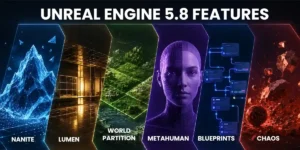
Nanite Changes the Economics of High-Detail Geometry
Detailed environments create a familiar trade-off: artists want more geometry, real-time performance demands that complexity stay controlled. Nanite changes part of that equation.
Epic’s virtualized geometry system works with very dense source meshes and manages the geometric detail the current view actually needs, on the fly. That cuts the dependence on hand-authored level-of-detail workflows for any asset Nanite supports. For projects built around architecture, rock formations, ruins, scanned environments, or other geometry-heavy content, this can genuinely reduce repetitive prep work. An environment artist keeps more of the source detail instead of manually rebuilding several simplified versions of the same asset.
None of that removes optimization from the equation. Texture memory, materials, shaders, animation, transparency, lighting, CPU load, streaming, and target hardware still decide what the game can afford. Nanite doesn’t eliminate the performance budget. It changes where the labor goes, freeing up time that used to be spent on geometry management so it can go somewhere else. Worth building that distinction into your art estimates and technical-art planning rather than treating Nanite as a shortcut past optimization altogether.
Lumen Makes Environment Changes Easier to Absorb
Lighting gets expensive when production changes force a team to keep revisiting baked or precomputed setups. Lumen gives Unreal projects dynamic global illumination and reflections that react as lights, geometry, and environments change.
Picture a level that shifts after playtesting: a doorway gets added, part of the environment becomes destructible, the time of day changes, a previously indoor space opens onto the outdoors. With dynamic lighting, the team evaluates those changes as they happen instead of treating every meaningful revision as a full lighting rebuild.
UE5.8 keeps pushing this toward a wider hardware range, too. At State of Unreal 2026, Epic showed Lumen improvements targeting 60fps on Nintendo Switch 2 and PC. That’s not a guarantee every project hits the same number; visual targets, scene complexity, hardware, resolution, and effects still need to be budgeted together. What Lumen actually buys a production team is flexibility, not free performance, and it’s worth planning around that specific advantage rather than a vaguer promise of “better lighting.”
World Partition and PCG Change How Large Worlds Get Built
Large environments create two problems at once: a runtime streaming problem, and a team-coordination problem, since multiple designers and artists often need to work across the same world without constantly stepping on each other.
World Partition handles the first by dividing a persistent world into grid cells that stream in and out based on sources like the player’s location, and it replaces most of the manual sublevel management that large Unreal worlds used to require. PCG handles the second: procedural rules generate a starting point for vegetation, environmental detail, repeated objects, and biome variation, so artists can put their manual effort where composition or gameplay actually needs it. UE5.8 pushes both further, with expanded PCG editing, new vegetation tools, and continued Mesh Terrain development.
For a studio planning an open-world or environment-heavy title, the win here isn’t just a bigger map. It’s whether the team can produce that world at a sustainable rate. If procedural tools cut down repetitive placement while World Partition keeps the environment manageable and streamable, the production model scales in a way a purely manual approach never will. Test that assumption early. A technically large world isn’t worth much if the content team can’t fill it inside the schedule.
MetaHuman Is Shortening Parts of Realistic Character Production
High-quality digital humans involve modeling, facial setup, rigging, animation, motion or performance capture, cleanup, retargeting, materials, hair, clothing, and runtime integration. That’s a long list, and MetaHuman doesn’t remove any of it from the pipeline. What it reduces is the foundational work needed to get a realistic human character to a usable starting point.
UE5.8 continues Epic’s push to handle more of that character and animation work directly inside Unreal, with expanded performance-capture and in-engine animation tools. That’s most relevant for projects carrying realistic NPCs, dialogue-heavy scenes, cinematic sequences, crowds, performance-captured characters, or deep character customization.
A bespoke hero character still needs custom art, animation, hair, clothing, facial work, shaders, and technical optimization. MetaHuman is a production framework, not a replacement for character artists. Its real value is starting the team from a stronger technical baseline so they can move faster into the parts of a character that actually need to be one-of-a-kind.
Blueprints and C++ Reduce Everyday Production Bottlenecks
The useful question for a professional Unreal project isn’t Blueprints or C++. Most serious productions get more out of deciding how the two work together.
Programmers build the foundational, complex, or performance-sensitive systems in C++, then expose the right controls through Blueprints so designers can tune values, assemble gameplay logic, and test variations without routing every small change back through engineering. Take a weapon system as an example: engineering owns replication, core firing logic, data structures, and performance-sensitive behavior, while a designer adjusts recoil, fire rate, damage values, effects, timing, and encounter-specific configurations directly. The iteration loop (build, test, adjust, retest) gets shorter because it no longer needs an engineer in the middle of every pass.
This only works with discipline. Large, loosely structured Blueprint systems get hard to debug and maintain fast, and putting every adjustable gameplay value behind engineering just slows the design team down for no reason. When you’re evaluating an Unreal team, ask which parts of the game will be owned in C++ and which parts designers can iterate through Blueprints. That answer tells you a lot more about production maturity than whether the team simply “knows Unreal.”
Chaos Makes Physics a Gameplay Decision, Not Just a Visual One
Physics matters most when it changes what players can actually do. Unreal’s Chaos ecosystem covers destruction, rigid-body simulation, cloth, vehicles, ragdolls, and physical animation, and UE5.8 moves both Dataflow and Chaos Cloth into production-ready status.
How much this matters depends entirely on the project. A destructible wall can change a combat space. Vehicle physics defines the handling model in a racing game. Physical objects can become part of a puzzle. Cloth and secondary motion improve character presentation without touching gameplay at all. These are genuinely different production problems wearing the same “physics” label.
The more gameplay depends on simulation, the earlier your team needs to prototype it. Physics-heavy systems bring CPU load, networking requirements, replication challenges, and debugging complexity that don’t always show up until systems start interacting unpredictably. It’s a lot cheaper to find those constraints in a representative prototype than after dozens of levels are already built around them.
Cross-Platform Development Still Requires Platform-Specific Work
Unreal supports development across PC, console, mobile, and XR, which is genuinely useful, but it doesn’t make cross-platform production automatic. A shared Unreal project cuts down duplicated work, but every target platform can still bring its own requirements around memory, rendering capability, frame rate, input, screen size, platform SDKs, network conditions, packaging, certification, and QA.
UE5.8 adds further mobile rendering and workflow improvements, part of Epic’s ongoing push to broaden Unreal beyond its traditional high-end PC and console reputation.
The practical takeaway: decide platform priorities before your production architecture is locked in. A project built from day one around a high-end PC spec can be expensive to retrofit onto constrained mobile hardware later, and a console release brings certification, input, memory, and platform-service requirements that a PC-only build never had to think about. Treat “cross-platform” as a planned production strategy from the start, not a late-stage export task you’ll figure out when you get there.
AI-Assisted Unreal Workflows Are Worth Watching, Not Building a Strategy Around Yet
UE5.8 introduces an experimental Model Context Protocol integration that lets external large language models connect with parts of an Unreal project: assets, Blueprints, levels, materials, and meshes. Epic describes possible uses around building or modifying systems, testing, optimization, and general project interaction.
The word experimental matters here, and it’s worth taking at face value. No studio should budget around the assumption that AI can autonomously build or maintain a production-ready Unreal project right now. The near-term opportunity is more modest and more practical: querying project information, handling repetitive setup, assisting structured modifications, supporting certain testing workflows, and cutting time spent on low-level busywork. Experienced developers still need to verify architecture, performance, gameplay behavior, security, and overall production quality, and none of that goes away.
For a decision-maker, MCP is a useful signal of where Unreal’s workflow is heading, not yet a reason to pick the engine on its own.
Where Unreal Engine Makes the Strongest Business Case
Unreal earns its complexity when several of its strengths line up with real project requirements at the same time.
| Project Consideration | Unreal Tends to Make a Stronger Case When… |
|---|---|
| Visual Target | High-detail 3D, dynamic lighting, cinematic presentation, or technically demanding visuals matter. |
| World Design | Large streamed environments or content-heavy spaces are central to the game. |
| Gameplay | Advanced physics, animation, multiplayer, or complex real-time systems are important. |
| Team | C++, Blueprint, technical-art, optimization, and Unreal pipeline skills are available. |
| Platforms | PC or console is central, or multi-platform requirements are defined early. |
| Production Workflow | Artists and designers need substantial in-engine iteration. |
| Scope | The project can justify Unreal’s tooling and technical overhead. |
There are also projects where Unreal adds more complexity than value: a lightweight 2D game, a highly constrained mobile product, or a small team with a mature pipeline already built around another engine may not get enough out of Unreal’s larger toolset to justify the switch. Engine selection should follow the project, not the reputation of the technology.
If the real decision in front of you is specifically Unity versus Unreal, that’s a separate evaluation. We cover it directly in our Unity vs Unreal comparison. Keeping that comparison on its own page means this article can stay focused on what UE5.8 actually changes, rather than re-litigating a question that already has its own answer elsewhere.
Unreal Engine Licensing Should Be Part of the Financial Model
Engine licensing belongs in the production decision because the economics shift once the game succeeds.
Under Epic’s current standard terms, Unreal Engine is free to use before a product passes $1 million in lifetime gross product revenue. Revenue above that threshold is generally subject to a 5% royalty under the standard license, though revenue from sales through the Epic Games Store is currently royalty-free for Unreal Engine calculations. Epic also runs a separate program, Launch Everywhere with Epic, that can bring the royalty down to 3.5% across eligible platforms and stores if you ship on the Epic Games Store at the same time as, or before, other storefronts.
For a prototype or a pre-revenue game, skipping the upfront royalty is a real advantage. For a commercially successful title, the team needs to model Unreal’s royalties alongside storefront fees, publisher terms, backend infrastructure, LiveOps, third-party SDKs, ongoing content production, and support. Licensing shouldn’t decide the engine on its own, but it belongs in the commercial model from the beginning, not something discovered close to launch. Epic’s terms can change, so check the current agreement before making financial or legal decisions based on any of this.
What Should a Team Validate Before Committing to Unreal?
The most useful Unreal evaluation doesn’t happen in a feature checklist. It happens in a prototype or vertical slice built around the project’s biggest risks, and different games need to prove different things. A console action game might need to show target-quality visuals at the required frame rate. A multiplayer title needs to prove replication and server behavior. A mobile project has to validate memory use, thermal performance, loading times, and device coverage. An open-world game needs to establish whether the intended world density can actually be streamed and produced on schedule.
Before committing the larger budget, get clear answers to four questions.
Can the core gameplay be built cleanly? Prototype the systems that define the game. Don’t spend the whole validation phase proving out menus and splash screens while the riskiest mechanic stays theoretical.
Can the visual target run on the intended hardware? Test representative characters, environments, lighting, VFX, UI, and gameplay together. An empty scene hitting the target frame rate proves nothing about the finished game.
Can the team produce content fast enough? A beautiful vertical slice can still be hiding a production problem. If every environment or mission takes too long to reproduce at scale, the project needs a different content strategy before full production starts.
Can the architecture support the intended scale? Multiplayer, open-world, live-service, and content-heavy projects need their expensive technical assumptions validated early. A prototype is a lot cheaper than rebuilding a production architecture after those assumptions turn out to be wrong.
This is where experienced Unreal engineering earns its value: not by proving a feature is technically possible, but by figuring out what needs to be proven before the project starts depending on it. Our guide on hiring Unreal developers walks through what to look for once you’re ready to bring that expertise in.
Should a New Project Use UE5.8 or Wait for Unreal Engine 6?
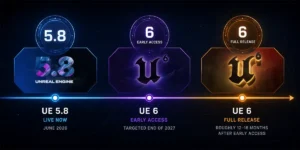
For most projects starting now, waiting on Unreal Engine 6 alone is hard to justify. Epic is targeting UE6 Early Access for the end of 2027, with a full release roughly 12–18 months after that. Epic has also said the intent is to bring existing UE5 projects forward rather than force a hard break. Actors and Blueprints will remain available in early UE6 builds while the newer framework matures.
UE6 is expected to bring Unreal Engine and UEFN closer together, shift more gameplay programming toward Verse, and expand support for portable content, live ecosystems, and AI-assisted workflows. Those are strategically important plans. They’re not production-ready reasons to delay a game that UE5.8 can already build.
For a project starting in 2026, the practical move is to choose the technology that supports today’s requirements while avoiding architecture decisions that would make a future upgrade unnecessarily painful. Roadmaps are useful for informing production planning; they’re a poor substitute for it.
Final Thoughts
Unreal Engine 5.8 earns its place in a production plan because its individual pieces solve different parts of the same underlying problem: building increasingly complex games without every new requirement spawning its own disconnected pipeline. Nanite cuts geometry prep work. Lumen makes lighting changes cheaper to absorb. World Partition and PCG make large environments manageable. MetaHuman moves character work closer to the runtime. Blueprints and C++ shorten the loop between design and engineering. Chaos gives physics a real role in gameplay, not just presentation. And the experimental MCP integration is an early look at where development assistance might go next.
None of that guarantees Unreal is the right engine for your project. That still comes down to the game itself: platforms, visual target, technical risk, content volume, team capability, schedule, and commercial model.
If Unreal looks like a fit after working through those questions, the next step is proving it in a prototype before full production starts. Red Apple Technologies supports Unreal Engine game development across prototyping, gameplay engineering, Blueprint and C++ workflows, asset integration, multiplayer, optimization, testing, and platform delivery, and you can see some of that work in our games portfolio. That’s the real arc of an engine evaluation: going from “Unreal can do this” to “we’ve proven this project can do it within its actual constraints.

Published by
Kaushik Dey
Related Blogs
Discover more stories & insights that inspire
Most teams think they have a hiring problem. They don’t. They have a structure problem discussed as a hiring problem. Because when a project slows down, the instinct is predictable:...

Whether it is making strategic decisions, providing employee training, or fulfilling other organizational goals, simulation has evolved as an indispensable tool in global businesses. From Healthcare to Education, Software Development,...
With the rising number of gamers every year, developing high-quality games of distinct genres has become a priority for game studios to boost user retention. As game development involves numerous...

Video game development not only requires fresh ideas but also involves using the right game engine where consulting a professional game development company is essential. As of now, enterprises are...
It is not that one day you get and start designing a game. Game development involves a lot of efforts and planning. Unity vs Unreal vs Native; you need to determine...


 Book An Appointment
 WhatsApp